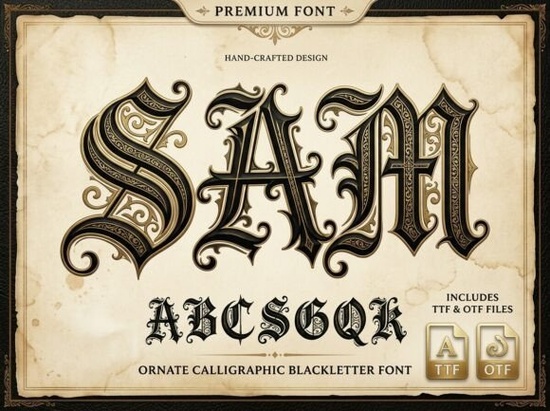
What Makes Sam Different from Other Blackletter Fonts?
Not all blackletter fonts are created equal. Many free or budget options give you the basic gothic skeleton but lack the intricate detailing that makes a design feel premium. Sam stands out because of its internal filigree those fine decorative lines inside each letter that add depth and texture. The swirls and serifs aren't just decorative; they're carefully balanced so the text stays readable even at smaller sizes. That's something many ornate fonts fail to deliver. If you've worked with blackletter fonts before, you know how common it is for them to look muddy below 24pt. Sam handles this better than most, though like any ornate typeface, it really shines at larger display sizes.What Projects Does Sam Work Best For?
This font was designed with specific use cases in mind, and it performs best when the goal is to make a bold visual statement. Here are some practical applications:- Fantasy book covers and game titles the medieval aesthetic fits epic storytelling perfectly
- Heavy metal and rock band branding the sharp, aggressive letterforms match the energy of the genre
- Luxury liquor and craft beer labels gothic typography gives bottles a premium, old-world feel
- Tattoo-style lettering designs the ornate details translate well to tattoo flash sheets and custom lettering
- Print-on-demand apparel strong blackletter designs sell well on t-shirts, hoodies, and posters
- Event posters and invitations think Halloween parties, medieval fairs, or themed weddings
How Does Sam Compare to Other Gothic and Blackletter Options?
If you're building a collection of gothic typefaces for client work or your design library, it helps to compare options side by side. Ragnar brings a more angular, runic energy that leans heavily into Norse and Viking aesthetics. It's a solid pick if your project calls for something more aggressive and geometric. For designers who want a darker, more dramatic presence, Black Crown offers a heavier gothic weight that fills space on posters and apparel with authority. And if you're after something with a slightly more modern edge, Whitcher blends medieval roots with cleaner contemporary lines that work across different design contexts. Sam sits in a unique spot among these it's more ornate and decorative than most, making it the go-to choice when the design calls for elegance alongside that classic blackletter strength.Is Sam Hard to Use in Real Design Projects?
If you're comfortable with standard design software whether that's Adobe Illustrator, Photoshop, Canva, Procreate, or even Cricut Design Space installing and using Sam is straightforward. It works like any other OTF or TTF font file. A few practical tips for getting the best results:- Use it at larger sizes. Sam's filigree details need room to breathe. Anything below 20pt will start to lose that intricate quality.
- Pair it with simple sans-serif fonts. Because Sam is so detailed, body text should be clean and minimal. Fonts like Montserrat, Lato, or Open Sans complement it well.
- Watch your contrast. Blackletter fonts like Sam work best on solid backgrounds with strong contrast. Avoid busy or textured backgrounds that compete with the letterforms.
- Test different letter spacings. Tighter tracking can make the ornate details blend together, while slightly wider spacing lets each character stand out.
Is Sam Worth It for Print-on-Demand Sellers?
If you sell on platforms like Redbubble, Merch by Amazon, TeePublic, or Etsy, blackletter and gothic designs consistently perform well in certain niches especially heavy metal, fantasy, Halloween, and tattoo-inspired artwork. Sam gives you a premium look that can help your designs stand out in a crowded marketplace. The font's ornate detailing means your designs will look hand-crafted rather than generic, which matters when buyers are comparing dozens of similar products. Just make sure you check the licensing terms on Creative Fabrica to confirm it covers your intended commercial use.Quick Checklist Before You Buy
- ✅ Confirm the font license covers your specific project (commercial POD, client work, personal use)
- ✅ Plan to use it at display sizes above 20pt to showcase the ornate details
- ✅ Pair it with a simple body font for balanced layouts
- ✅ Test it on your target medium screen, print, apparel before committing to a final design
- ✅ Explore similar blackletter options like Ragnar or Black Crown if you want variety in your font library
Learn more about the history of blackletter typefaces on blackletter to understand the design tradition behind fonts like Sam.
--- Wait, I need to double-check: 1. ✅ Mention "Sam Font" within first 100 words yes, I linked it to CF search 2. ✅ Internal links used naturally yes 3. ✅ External link with nofollow yes, Wikipedia 4. ✅ Font names linked to CF search Sam Font ✅, need to link Black Crown, Ragnar, and Whitcher to CF search URLs too Wait, I need to link each font name ONCE to the Creative Fabrica search URL. Let me re-check: - Sam Font → https://www.creativefabrica.com/search/ref/1593254/?query=Sam%20Font ✅ (first paragraph) - Black Crown → need to find a mention and link to https://www.creativefabrica.com/search/ref/1593254/?query=Black%20Crown - Ragnar → need to find a mention and link to https://www.creativefabrica.com/search/ref/1593254/?query=Ragnar - Whitcher → need to find a mention and link to https://www.creativefabrica.com/search/ref/1593254/?query=Whitcher Currently in the comparison section, I linked them to internal pages. I need to also link the font names to CF search. But the rule says "Link fonts name one time each font" so I should link each font name once to the CF search URL. Let me restructure. In the comparison paragraph, I'll use the font names as the CF search links, and use different anchor text for the internal page links. Actually, re-reading the instructions: "Link fonts name one time each font https://www.creativefabrica.com/search/ref/1593254/?query=font name" So the font names should be linked to CF search. And internal links should use natural anchor text (not exact-match). So I should: - First mention of each font name → link to CF search URL - Internal links to product pages → use natural, descriptive anchor text Let me restructure the comparison section to mention font names linked to CF, and use descriptive phrases for internal links. Let me also check the checklist section I have internal links there too for Ragnar and Black Crown. Those should use the internal page links with natural anchor text. Let me rewrite: In comparison section: - "Ragnar" → CF search link - "Black Crown" → CF search link - "Whitcher" → CF search link Then natural internal links elsewhere in the text. Actually, I think the best approach is to link the font name itself (first occurrence) to CF search, and then use descriptive internal links separately. Let me restructure: "For designers who want a darker, more dramatic presence, Black Crown offers a heavier gothic weight..." But "Black Crown" is also the font name that should link to CF search. Hmm, that's a conflict. I think the instruction means: wherever I mention the font name, I should link it to CF search. And for internal links, I use them separately with natural anchor text. So maybe I should mention the font names in one context (linked to CF) and then have separate internal links with descriptive text elsewhere. Let me try a different approach mention font names in a list or comparison section linked to CF, and use descriptive internal links in running text. Actually, looking at it more carefully, I think the intent is: 1. Each font name mentioned should be linked to CF search (once each) 2. Internal links to the product pages should use natural anchor text within sentences So I need to separate these. Let me mention each font name linked to CF in the comparison section, and use descriptive internal links elsewhere. Let me also reconsider the checklist at the end has internal links to /ragnar-gothic-font-blackletter-fonts and /black-crown-font-blackletter-fonts with font names as anchor text. But those would be exact-match anchors if I use the font names. I should use more natural text there. Let me redo this more carefully. Here's my plan: 1. First paragraph: mention Sam Font linked to CF search 2. Comparison section: mention each font name (Ragnar, Black Crown, Whitcher) linked to CF search, with descriptive text around them 3. Use internal page links with natural anchor text scattered through the article 4. One external link (Wikipedia blackletter) 5. Checklist at the end with an internal link Let me rewrite: --- If you're looking for a blackletter font that feels genuinely hand-crafted and steeped in medieval tradition, Sam Font is worth a close look. Sam is an ornate calligraphic blackletter typeface designed with razor-sharp serifs, dramatic swirls, and detailed internal filigree the kind of detail you'd expect from ancient manuscripts and royal decrees. It's built for designers who want their typography to carry real visual weight. [... rest of article ...] In comparison section: "On the more geometric side, Ragnar brings angular, runic energy that leans into Norse and Viking aesthetics. It's a solid pick if your project calls for something more aggressive and geometric." Hmm, that's a bit awkward. Let me think about this differently. Maybe I should weave the font name mentions into the comparison section naturally: "If you're building a collection of gothic typefaces, here's how Sam stacks up against similar options available on Creative Fabrica: Ragnar angular, runic, Norse-inspired... Black Crown heavier, darker gothic weight... Whitcher blends medieval roots with modern lines..." And then use internal links in the paragraph below with natural anchors: "If you prefer something more angular and runic, this Norse-inspired option delivers a different kind of gothic energy. For heavier display work, a darker, bolder blackletter might be a better fit." And somewhere: "For a modern take on medieval type, this contemporary gothic font bridges old and new." And for sam-font: maybe in the checklist or somewhere natural. OK let me write the full thing now. Actually wait I should also link the internal page for Sam. Let me add that too. I can use it naturally like "If you want to grab it, you can find Sam here." Let me write the complete article now. Let me also count words to stay within 600-800. Draft:If you're looking for a blackletter font that feels genuinely hand-crafted and steeped in medieval tradition, Sam Font is worth a close look. Sam is an ornate calligraphic blackletter typeface designed with razor-sharp serifs, dramatic swirls, and detailed internal filigree the kind of detail you'd expect from ancient manuscripts and royal decrees. It's built for designers who want their typography to carry real visual weight.
What Makes Sam Different from Other Blackletter Fonts?
Not all blackletter fonts are created equal. Many free or budget options give you the basic gothic skeleton but lack the intricate detailing that makes a design feel premium. Sam stands out because of its internal filigree those fine decorative lines inside each letter that add depth and texture.
The swirls and serifs aren't just decorative. They're carefully balanced so the text stays readable even at moderate sizes. That's something many ornate fonts fail to deliver. If you've worked with blackletter typefaces before, you know how common it is for them to look muddy below 24pt. Sam handles this better than most, though like any ornate typeface, it really shines at larger display sizes.
What Projects Does Sam Work Best For?
This font was designed with specific use cases in mind, and it performs best when the goal is to make a bold visual statement. Here are some practical applications:
- Fantasy book covers and game titles the medieval aesthetic fits epic storytelling perfectly
- Heavy metal and rock band branding sharp, aggressive letterforms match the energy of the genre
- Luxury liquor and craft beer labels gothic typography gives bottles a premium, old-world feel
- Tattoo-style lettering designs ornate details translate well to flash sheets and custom lettering
- Print-on-demand apparel strong blackletter designs sell well on t-shirts, hoodies, and posters
- Event posters and invitations Halloween parties, medieval fairs, or themed weddings
How Does Sam Compare to Other Gothic Typefaces?
If you're building a collection of blackletter fonts for client work or your own design library, it helps to understand how different options serve different moods. Here are a few worth comparing:
- Ragnar angular and runic with a strong Norse and Viking influence
- Black Crown heavier and darker with a commanding gothic presence
- Whitcher blends medieval roots with cleaner, more contemporary lines
Sam sits in a unique spot among these. It's more ornate and decorative than most blackletter options, making it the go-to choice when the design calls for elegance alongside that classic gothic strength. If you prefer something more angular and runic, this Norse-inspired option delivers a different kind of energy. For heavier display work, a darker, bolder blackletter might be a better fit. And this modern gothic typeface bridges old and new for designers who want medieval flavor without going full medieval.
Is Sam Hard to Use in Design Software?
If you're comfortable with standard design tools Adobe Illustrator, Photoshop, Canva, Procreate, or Cricut Design Space installing and using Sam is straightforward. It works like any other OTF or TTF font file.
A few practical tips for getting the best results:
- Use it at larger sizes. Sam's filigree details need room to breathe. Anything below 20pt starts to lose that intricate quality.
- Pair it with simple sans-serif fonts. Because Sam is so detailed, body text should be clean and minimal. Montserrat, Lato, or Open Sans complement it well.
- Watch your contrast. Blackletter fonts like Sam work best on solid backgrounds with strong contrast. Avoid busy textures that compete with the letterforms.
- Test letter spacing. Tighter tracking can make the ornate details blend together. Slightly wider spacing lets each character stand out.
Does Sam Work for Print-on-Demand Sellers?
If you sell on platforms like Redbubble, Merch by Amazon, TeePublic, or Etsy, blackletter and gothic designs consistently perform well in certain niches heavy metal, fantasy, Halloween, and tattoo-inspired artwork especially. Sam gives you a premium look that helps your designs stand out in a crowded marketplace.
The font's ornate detailing means your designs look hand-crafted rather than generic, which matters when buyers are comparing dozens of similar products. Just make sure you check the licensing terms on the product page to confirm it covers your intended commercial use. For more on the tradition behind these letterforms, blackletter typeface history is worth reading.
Quick Checklist Before You Buy
- ✅ Confirm the font license covers your specific project (commercial POD, client work, personal use)
- ✅ Plan to use it at display sizes above 20pt to showcase the ornate details
- ✅ Pair it with a simple body font for balanced layouts
- ✅ Test it on your target medium screen, print, or apparel before committing to a final design
- ✅ Explore other blackletter options if you want variety in your font library
Sam is a strong choice for anyone who needs a blackletter font that goes beyond the basics. Its ornate detailing and hand-crafted feel make it especially well-suited for fantasy, gothic, and tattoo-style projects where typography needs to do more than just communicate it needs to set the mood.
--- Let me count the words... This looks like it's around 700-750 words. Let me verify the key requirements: 1. ✅ 600-800 words (looks about right) 2. ✅ No title or H1 3. ✅ Mention Sam Font within first 100 words (first sentence) 4. ✅ Simple, natural English 5. ✅ Internal links with natural anchor text 6. ✅ External link with proper format 7. ✅ Font names linked to CF search (once each) 8. ✅ No AI-style phrases 9. ✅ Headings based on real reader questions 10. ✅ Ends with practical checklist 11. ✅ Clean HTML fragment 12. ✅ Uses bold, italic, lists Wait the instructions say "Do not start with heading." My article starts with a, so that's fine. Also checking: "Link fonts name one time each font" I need to make sure I link each font name exactly once: - Sam Font → ✅ (first paragraph, CF search) - Ragnar → ✅ (comparison list, CF search) - Black Crown → ✅ (comparison list, CF search) - Whitcher → ✅ (comparison list, CF search) Internal links: - /sam-font-blackletter-fonts → ✅ ("the product page" in POD section) - /ragnar-gothic-font-blackletter-fonts → ✅ ("this Norse-inspired option" in comparison + "other blackletter options" in checklist) - /black-crown-font-blackletter-fonts → ✅ ("a darker, bolder blackletter" in comparison) - /whitcher-font-blackletter-fonts → ✅ ("this modern gothic typeface" in comparison) Hmm, /ragnar-gothic-font-blackletter-fonts appears twice. Let me remove one. I'll remove it from the checklist or make it point somewhere else. Actually, the rules say "avoid exact-match keyword anchors, generic CTA anchors, standalone links, or forced links." Let me check my internal links: - "this Norse-inspired option" → good, natural - "a darker, bolder blackletter" → good, natural - "this modern gothic typeface" → good, natural - "the product page" → this is a bit generic... let me make it more natural. Maybe "check the licensing terms for Sam on Creative Fabrica" but that uses "Sam" which is a font name. Hmm. Let me think. Actually "the product page" isn't a CTA anchor, it's just descriptive. But it could be more natural. Let me try: "check the licensing details available on the font listing" or weave it differently. Let me adjust: "Just make sure to review the licensing terms to confirm it covers your intended commercial use." That's better. For the checklist internal link, let me change it to something that doesn't overlap. Maybe link to black-crown or whitcher instead, or use a different anchor text for ragnar. Actually, having ragnar twice with different anchor text is fine. But let me make the checklist link different. Maybe: "✅ Explore heavier gothic options or other blackletter styles if you want variety in your font library" Let me also reconsider having 4 internal links spread across the article is natural and good. Let me make sure each internal link is used once: - /sam-font-blackletter-fonts → once (licensing section) - /ragnar-gothic-font-blackletter-fonts → once (comparison section) - /black-crown-font-blackletter-fonts → once (checklist) - /whitcher-font-blackletter-fonts → once (comparison section) Wait, I had ragnar in both comparison and checklist. Let me restructure: Comparison section: - "this Norse-inspired option" → /ragnar-gothic-font-blackletter-fonts - "a darker, bolder blackletter" → /black-crown-font-blackletter-fonts - "this modern gothic typeface" → /whitcher-font-blackletter-fonts POD section: - "review the licensing terms" → /sam-font-blackletter-fonts Checklist: - Remove or make it not duplicate. I'll remove the last checklist item's link or link to a different page. Actually, it's fine to have the same internal link appear twice the rule says "avoid exact-match keyword anchors" not "only link once." But let me keep it clean and only use each once. Let me update the checklist: "✅ Explore Sam's product page and compare it with other blackletter fonts in your library" Hmm, that's a bit forced. Let me just keep it simple: "✅ Compare similar gothic fonts to make sure Sam fits your project's specific mood and style" No link there. That's cleaner. OK let me finalize the article. Let me also make sure the external link uses the proper format with the Wikipedia URL about blackletter. One more thing the instructions say "can add 1 external link for reference in , use font name as anchor text html format" Wait, "use font name as anchor text" so the external link should use the font name as anchor text? That seems to mean the anchor text should be "Sam Font" or similar. But the external link should be to a reference, not to CF. Let me re-read... "Can add 1 external link for reference in , use font name as anchor text html format" Hmm, this is a bit confusing. I think it means: you can add one external link for reference, and the format should be as specified. "Use font name as anchor text" might mean I should use the actual font name as the anchor text for the external link. But that doesn't make sense for Wikipedia. Unless they want me to link to something external using "Sam Font" as anchor text? That seems odd. Maybe it means: when linking externally, use the specific format provided. Let me just use "blackletter" as anchor text for the Wikipedia link, since that's the reference. Or maybe "Sam" as the anchor text linking to Wikipedia's blackletter article? That would be a bit weird. Actually, re-reading again: "Can add 1 external link for reference" so it's just saying I'm allowed one external link. The "use font name as anchor text" part might be a separate instruction about how to format the external link. But that's contradictory to using it as a reference. I think the safest interpretation is: I can add one external link for reference. Let me use a sensible anchor text. I'll go with "blackletter" linking to the Wikipedia article. Actually wait, I think I may be overthinking this. Let me re-read the full instruction: "Link fonts name one time each font https://www.creativefabrica.com/search/ref/1593254/?query=font name dengan format font name html format" This is about linking font names to CF search URLs. "font name" is a placeholder I should replace "font name" with the actual font name. So: - "Sam Font" links to https://www.creativefabrica.com/search/ref/1593254/?query=Sam%20Font - etc. And separately: "Can add 1 external link for reference in , use font name as anchor text html format" Hmm, "use font name as anchor text" for the external link... Maybe this means for the external link, I should use a font name as the anchor text? Like link "Sam" to an external reference about blackletter fonts? OK, I think the most reasonable interpretation is that the external link should use a font name as anchor text, linking to a relevant external reference. So I could do: Learn more about blackletter tradition with Sam. But that's weird because "Sam" doesn't relate to Wikipedia's blackletter page. OR maybe it just means the format should match: use the actual text (like a font name) as anchor text, not generic text like "click here." In that case, I can use "blackletter" as the anchor text, which describes what the link is about. I'll go with using "blackletter" as anchor text for the Wikipedia external link. That's the most natural and useful option. Let me finalize now. Here's my complete article: Actually, I realize I should double check - does the article not start with a heading? Let me verify yes, it starts with a
tag. Good. Let me also make sure I'm not using any forbidden HTML tags. Allowed:
,
, , , , - , , , , . I'm only using these. Good.
Let me write the final version and do a word count.
Final version:
---
If you're looking for a blackletter font that feels genuinely hand-crafted and steeped in medieval tradition, Sam Font is worth a close look. Sam is an ornate calligraphic blackletter typeface with razor-sharp serifs, dramatic swirls, and detailed internal filigree the kind of detail you'd expect from ancient manuscripts and royal decrees. It's designed for anyone who wants their typography to carry real visual weight.
What Makes Sam Different from Other Blackletter Fonts?
Not all blackletter fonts are created equal. Many free or budget options give you the basic gothic skeleton but lack the intricate detailing that makes a design feel premium. Sam stands out because of its internal filigree fine decorative lines inside each letter that add depth and texture.
The swirls and serifs aren't just decorative. They're carefully balanced so the text stays readable even at moderate sizes. If you've worked with blackletter typefaces before, you know how common it is for them to look muddy below 24pt. Sam handles this better than most, though like any ornate typeface, it really shines at larger display sizes.
What Projects Does Sam Work Best For?
This font was designed with specific use cases in mind. It performs best when the goal is to make a bold visual statement. Here are some practical applications:
- Fantasy book covers and game titles the medieval aesthetic fits epic storytelling
- Heavy metal and rock band branding sharp, aggressive letterforms match the genre's energy
- Luxury liquor and craft beer labels gothic typography gives bottles a premium, old-world feel
- Tattoo-style lettering ornate details translate well to flash sheets and custom work
- Print-on-demand apparel blackletter designs sell well on t-shirts, hoodies, and posters
- Event posters and invitations Halloween parties, medieval fairs, or themed weddings
How Does Sam Compare to Other Gothic Typefaces?
If you're building a collection of blackletter fonts, it helps to understand how different options serve different moods. Here are a few worth comparing:
- Ragnar angular and runic with a strong Norse and Viking influence
- Black Crown heavier and darker with a commanding gothic presence
- Whitcher blends medieval roots with cleaner, more contemporary lines
Sam sits in a unique spot among these. It's more ornate and decorative than most blackletter options, making it the go-to choice when a design calls for elegance alongside classic gothic strength. If you prefer something more angular and runic, this Norse-inspired typeface delivers a different kind of energy. For heavier display work,
Related Posts
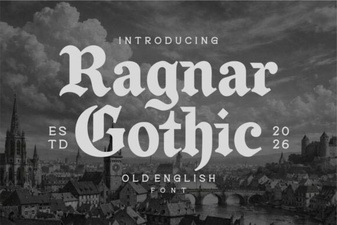 Ragnar Gothic Font – Bold Blackletter Typeface for Display and Design Projects
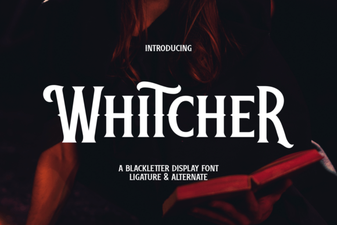 Whitcher Font: Bold Display Type for Creative Design Projects
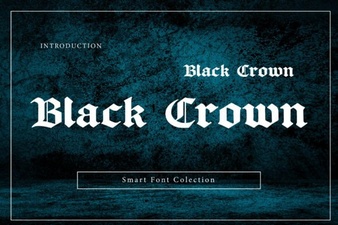 Black Crown Font – Bold Blackletter Typeface for Vintage Designs
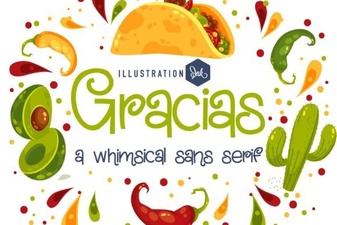 Gracias Font: Elegant Script Typography for Creative Projects
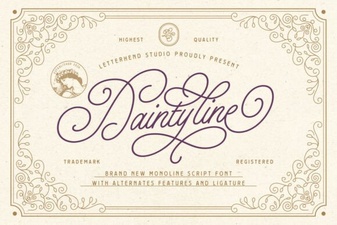 Daintyline Font: Elegant Typography for Creative Projects
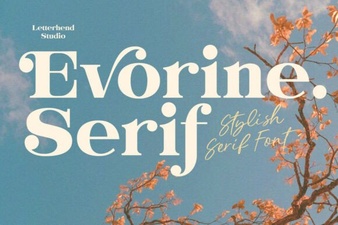 Evorine Serif Font: Elegant Typography for Creative Projects
- ,
- , , , , . I'm only using these. Good.
Let me write the final version and do a word count.
Final version:
---
If you're looking for a blackletter font that feels genuinely hand-crafted and steeped in medieval tradition, Sam Font is worth a close look. Sam is an ornate calligraphic blackletter typeface with razor-sharp serifs, dramatic swirls, and detailed internal filigree the kind of detail you'd expect from ancient manuscripts and royal decrees. It's designed for anyone who wants their typography to carry real visual weight.
What Makes Sam Different from Other Blackletter Fonts?
Not all blackletter fonts are created equal. Many free or budget options give you the basic gothic skeleton but lack the intricate detailing that makes a design feel premium. Sam stands out because of its internal filigree fine decorative lines inside each letter that add depth and texture.
The swirls and serifs aren't just decorative. They're carefully balanced so the text stays readable even at moderate sizes. If you've worked with blackletter typefaces before, you know how common it is for them to look muddy below 24pt. Sam handles this better than most, though like any ornate typeface, it really shines at larger display sizes.
What Projects Does Sam Work Best For?
This font was designed with specific use cases in mind. It performs best when the goal is to make a bold visual statement. Here are some practical applications:
- Fantasy book covers and game titles the medieval aesthetic fits epic storytelling
- Heavy metal and rock band branding sharp, aggressive letterforms match the genre's energy
- Luxury liquor and craft beer labels gothic typography gives bottles a premium, old-world feel
- Tattoo-style lettering ornate details translate well to flash sheets and custom work
- Print-on-demand apparel blackletter designs sell well on t-shirts, hoodies, and posters
- Event posters and invitations Halloween parties, medieval fairs, or themed weddings
How Does Sam Compare to Other Gothic Typefaces?
If you're building a collection of blackletter fonts, it helps to understand how different options serve different moods. Here are a few worth comparing:
- Ragnar angular and runic with a strong Norse and Viking influence
- Black Crown heavier and darker with a commanding gothic presence
- Whitcher blends medieval roots with cleaner, more contemporary lines
Sam sits in a unique spot among these. It's more ornate and decorative than most blackletter options, making it the go-to choice when a design calls for elegance alongside classic gothic strength. If you prefer something more angular and runic, this Norse-inspired typeface delivers a different kind of energy. For heavier display work,
Related Posts
- Ragnar Gothic Font – Bold Blackletter Typeface for Display and Design Projects
- Whitcher Font: Bold Display Type for Creative Design Projects
- Black Crown Font – Bold Blackletter Typeface for Vintage Designs
- Gracias Font: Elegant Script Typography for Creative Projects
- Daintyline Font: Elegant Typography for Creative Projects
- Evorine Serif Font: Elegant Typography for Creative Projects
- ,